Who this is for
Whiteboard explainers are good at one thing: making an idea feel simple. That is what early-stage founders need on a landing page, what product teams need when a feature launches, and what customer education teams need when the same question keeps arriving in support.
- Founders: a 1 minute “what we do and why it matters” video for the homepage, a pitch follow-up or an investor update.
- Product and marketing teams: a short video for each feature launch, in Square 1:1 for LinkedIn or Tall 9:16 for Shorts and Reels.
- Customer education and support: “how it works” videos for your help centre, made from the help article you already wrote.
- Sales teams: a simple explainer to send after a call, so the champion can pass it on internally.
A sample product explainer script
Here is a sample 1 minute script for a made-up product, a temperature monitoring service for small food shops. It follows a classic structure: problem, solution, how it works, outcome, next step.
Scene 1. Says If a shop fridge fails overnight, you find out in the morning, along with a bin full of spoiled stock.
Drawn A shop fridge with a wavy heat line coming out of it and a moon in the window.
Scene 2. Says Our small sensor sits inside each fridge and checks the temperature every few minutes.
Drawn A small round sensor stuck inside a fridge door, with a thermometer symbol on it.
Scene 3. Says It sends every reading to the cloud, so you don't need to be there to know it's working.
Drawn A dotted line from the sensor up to a cloud, then down to a phone.
Scene 4. Says If the temperature rises, your phone gets an alert straight away, day or night.
Drawn A phone buzzing with a notification labelled Fridge 2: too warm.
Scene 5. Says The dashboard keeps a log of every fridge, ready for your next food safety check.
Drawn A dashboard with three small line charts labelled Fridge 1, Fridge 2 and Fridge 3, and a clipboard with a tick.
Scene 6. Says Set up takes ten minutes. Start your free trial today.
Drawn A stopwatch showing ten minutes next to a button labelled Start free trial.
For more structures and opening lines, see how to write an explainer video script and explainer video ideas.
How it works for product teams
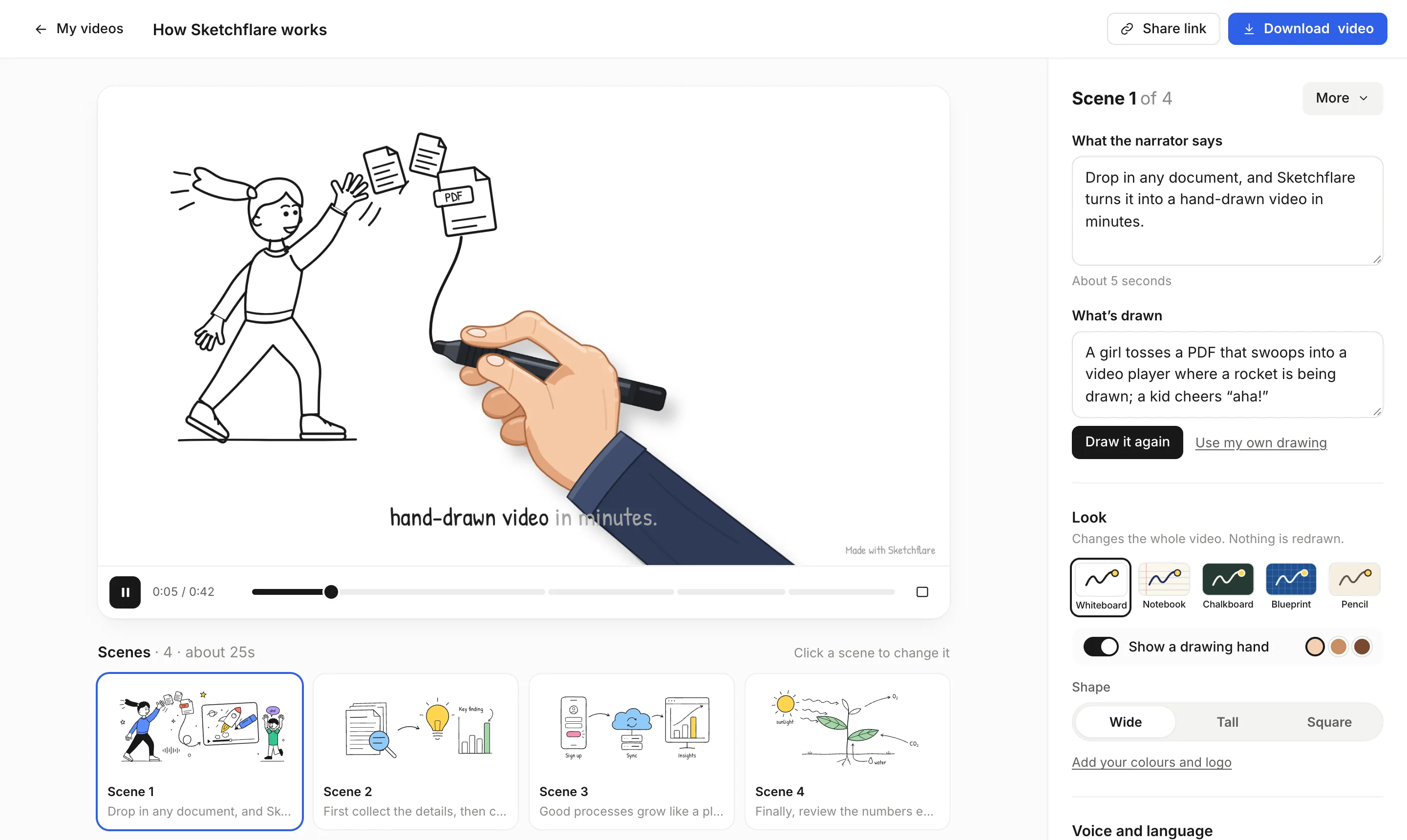
- Start from your material. Type a short description of the product and who it is for, upload a product brief or help article (PDF, TXT or Markdown; text-based PDFs work best), or choose “Paste my script” to keep your copywriter's exact words.
- Pick the look and voice. Whiteboard is the classic explainer look; Blueprint suits technical and developer products; Pencil feels softer and more editorial. Choose a narrator such as Alice (clear, confident, British) or Matilda (friendly, upbeat, American), and add a drawing hand if you want the pen to move on screen.
- Set length and shape. About 30 seconds or 1 minute for a homepage or social post, 2 to 3 minutes for a help-centre walkthrough. Wide 16:9 for your site and YouTube, Square 1:1 for LinkedIn and feeds, Tall 9:16 for Shorts, Reels and TikTok.
- Review every scene. Tighten the narration, rename things to match your product, and rewrite “What's drawn” then press “Draw it again” when a drawing misses. For your logo mark or a specific diagram, upload an SVG with “Use my own drawing”.
- Add your brand and export. On Pro and Team, the brand kit sets your marker colour, up to three accent colours and a logo drawn in a corner of every frame. Download an MP4 in Full HD with .srt and .vtt subtitles, or share a link.
What to check before you publish
- Claims. Make sure every promise in the narration is true today: features, numbers, set-up time, integrations and prices.
- Names. Check your product name, feature names and any customer-facing terms are spelt the way you spell them.
- Tone. Read the script aloud. Cut anything that sounds like a sales deck and keep the sentences short.
- Captions. Social feeds often start videos muted, so keep captions on, and upload the .srt file where a platform accepts subtitle files.
- Call to action. End with one clear next step that matches the page or post the video will sit on.
Which plan you need
| Plan | Price (as of October 2026) | Fits |
|---|---|---|
| Free | $0 | Testing a script: 3 video minutes a month, 720p with a small “Made with Sketchflare” mark |
| Pro | $49 a month | Publishing on your site and socials: 60 video minutes, Full HD, no mark, brand kit, translations |
| Team | $99 per person a month | Customer education teams making a library of videos: 240 video minutes per person, priority support |
A video that represents your product in public should usually be made on Pro: no mark, 1080p and your brand colours and logo. Commercial use is allowed on every plan. If you're weighing this against a studio, our guides on what an explainer video costs and hiring an animator set out the trade-offs. See pricing.
Questions
How long should a product explainer video be?
Short enough to cover one idea: about 1 minute works for a homepage or launch post, 2 to 3 minutes for a how-it-works video. Sketchflare offers lengths from about 30 seconds to 10 minutes.
Can I use Sketchflare videos commercially, on my website and in ads?
Yes. Commercial use is allowed on every plan. Free videos carry a small “Made with Sketchflare” mark; Pro and Team videos don't.
Can I add my logo and brand colours?
Yes, on Pro and Team. The brand kit sets the marker colour, up to three accent colours used in drawings and a logo (PNG, JPG or SVG under 300 KB) drawn in a corner of every frame.
Can I make one explainer in several shapes?
Yes. Shape can be changed for the whole video in the editor, so you can download Wide 16:9 for your site, then Square 1:1 for LinkedIn and Tall 9:16 for Shorts.
Does Sketchflare show my real product screens?
No. Sketchflare draws concepts as line art and does not record screens. You can upload your own SVG drawing for any scene if you need a specific diagram.