Where a lesson video helps
You already explain things well at the front of the room. A short video lets that explanation travel: to students who were absent, to a class that wants to go over it again before a test, or to a flipped lesson where the explanation happens at home and class time goes on practice. It also gives you a consistent version of the explanation you give five times a year.
- Introducing a new topic in 2 or 3 minutes before you go deeper in class.
- Revision videos that walk through one idea, process or method at a time.
- Catch-up for absent students, so nobody misses the core explanation.
- Homework or flipped lessons, with class time used for questions and practice.
- Videos in another language for students who are still learning the language of instruction, in any of 16 languages.
A sample lesson script: photosynthesis
Here is a 1 minute script of the kind Sketchflare writes from the topic “photosynthesis for 11 year olds”, in the Chalkboard look with Sarah (soft, patient teacher) as narrator.
Scene 1. Says Plants can't go shopping for food. So how do they eat? They make their own, using sunlight.
Drawn A potted plant with a small question mark above it and a sun in the corner.
Scene 2. Says This is called photosynthesis. It happens mostly in the leaves.
Drawn A large leaf with the word Photosynthesis written above it.
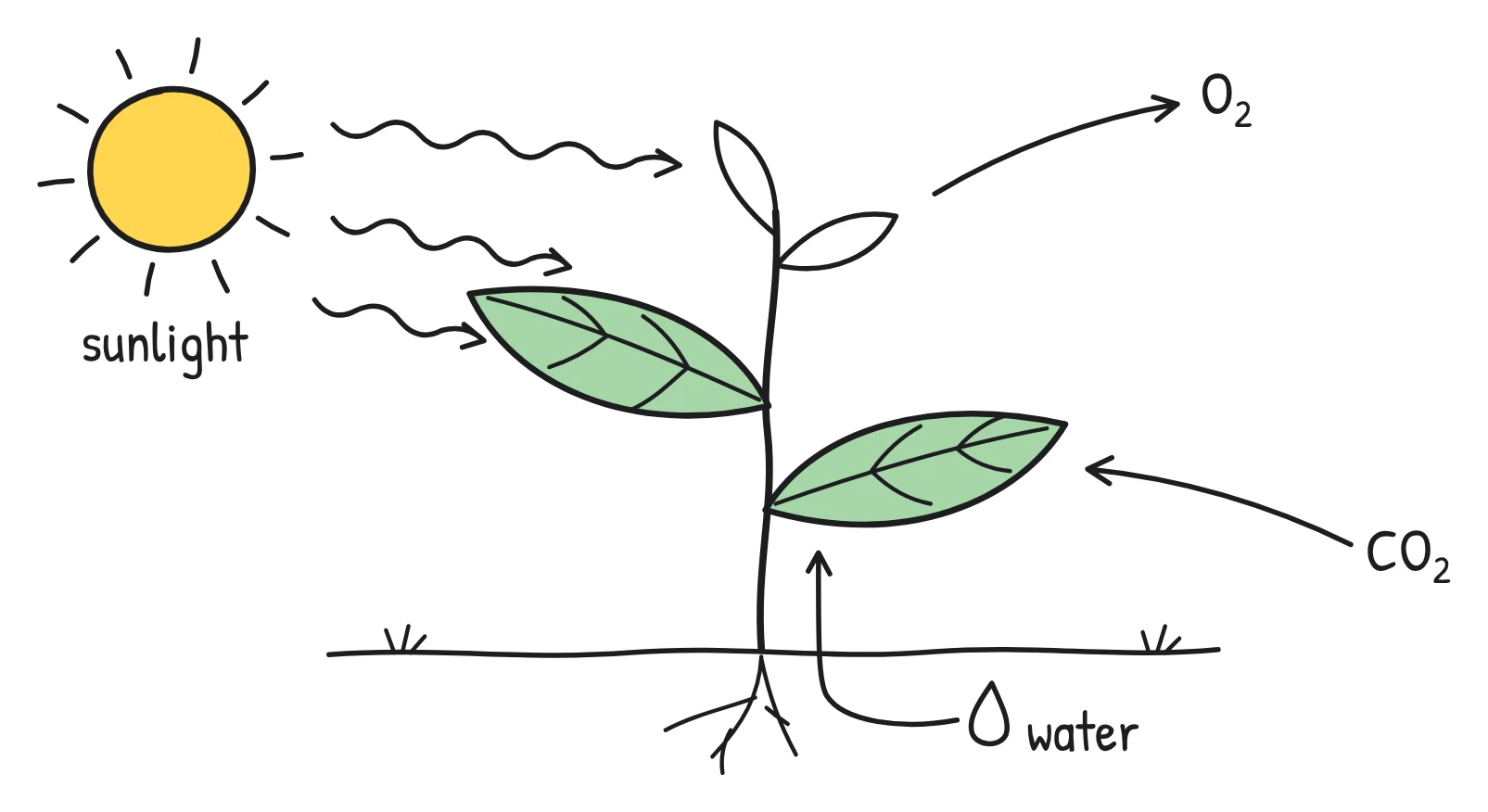
Scene 3. Says The plant needs three things: sunlight, water from the soil and carbon dioxide from the air.
Drawn The plant with three labelled arrows: Sunlight from the sun, Water coming up from the roots, Carbon dioxide going into the leaf.
Scene 4. Says A green substance in the leaves, called chlorophyll, captures the energy from the light.
Drawn A close-up of a leaf with small green dots labelled Chlorophyll catching rays of light.
Scene 5. Says The plant uses that energy to turn water and carbon dioxide into glucose, a kind of sugar it uses for food.
Drawn An arrow from water and carbon dioxide into a box labelled Glucose, with a small battery symbol.
Scene 6. Says And it gives off oxygen, which is the gas we breathe. So every leaf is a tiny food factory.
Drawn Arrows labelled Oxygen leaving the leaf towards a smiling child breathing in.
If the level isn't right, rewrite a line in the editor or make it again with a different topic, such as “photosynthesis for GCSE biology”. You can also paste a script you've written yourself, and every word is kept.
How it works for teachers
Start from what you have
Type a topic (adding the age or level helps), upload your lesson notes or a worksheet as a PDF, TXT or Markdown file, or paste a script. Text-based PDFs work best: scanned pages and diagrams inside a PDF are not read.
Pick the look, voice, length and shape
| Option | Choices | Classroom tip |
|---|---|---|
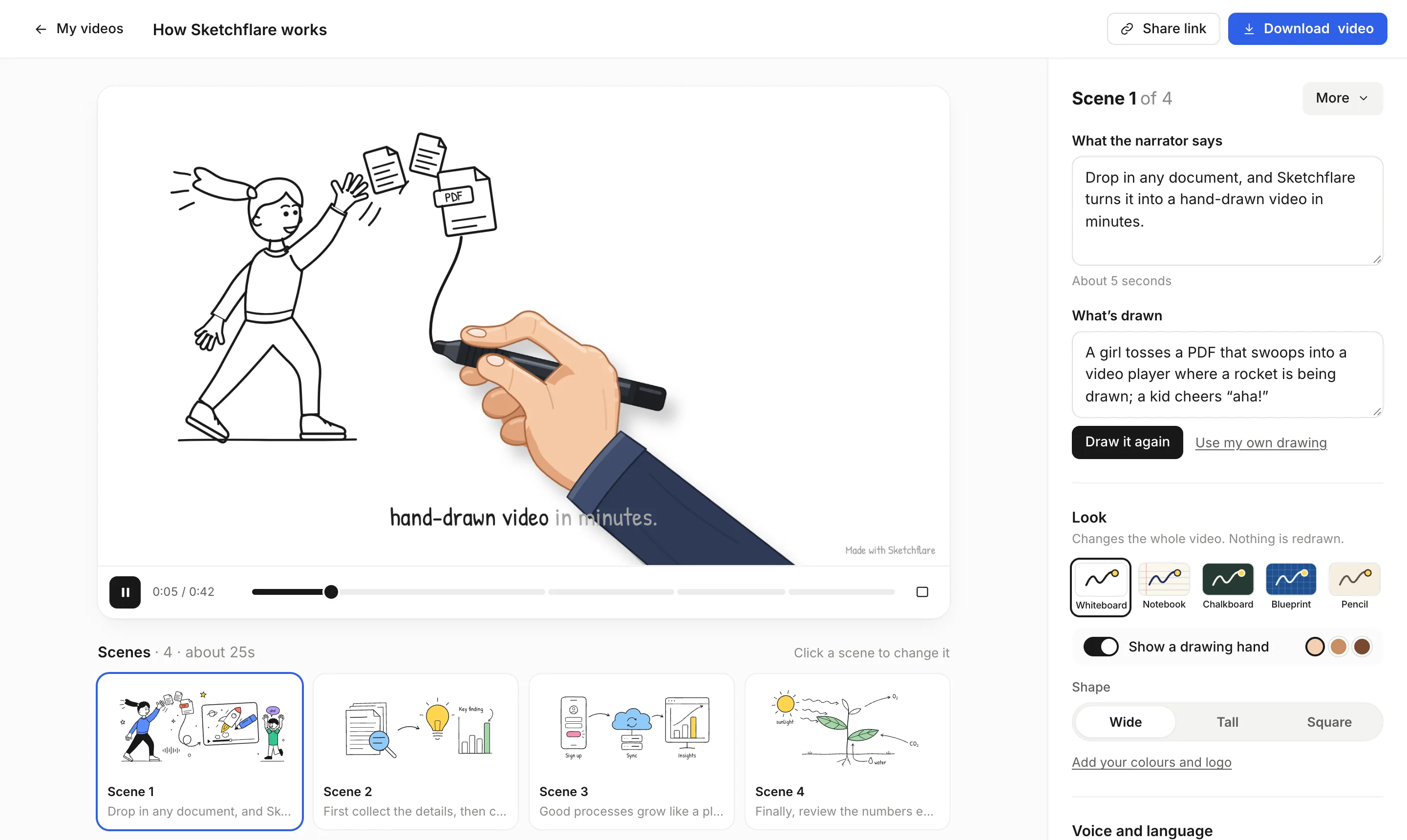
| Look | Whiteboard, Notebook, Chalkboard, Blueprint, Pencil | Chalkboard for a classroom feel, Notebook for revision notes, Blueprint for design and technology |
| Voice | George, Matilda, Brian, Alice, Daniel, Sarah, or no voice | Sarah (soft, patient teacher) or Alice (clear, confident, British) suit younger learners |
| Length | About 30 seconds, 1, 2, 3, 5 or 10 minutes | 1 to 3 minutes per idea keeps attention |
| Shape | Wide 16:9, Tall 9:16, Square 1:1 | Wide for the projector and learning platforms |
| Language | 16 languages | Make a version for students learning the language |
Review and edit the scenes
Each scene card shows “What the narrator says” and “What's drawn”. Fix a definition, simplify a word, change a drawing and press “Draw it again”, or upload your own SVG with “Use my own drawing”. Add a scene for a worked example, move scenes around or delete one. Switching the look changes the whole video instantly, without redrawing.
Share or download
Turn on a share link (“Anyone with the link can watch”) and post it in your class page; students need no account, and you can turn sharing off any time. Or download an MP4 to play offline, with .srt or .vtt subtitles for your video player.
What to check before you show it
- Accuracy. Check facts, definitions and worked examples against your curriculum. AI can simplify a little too far.
- Level and vocabulary. Make sure the words suit your students. Swap a technical term for a simpler one, or add a scene that defines it.
- Labels in drawings. Check spelling and that each label points to the right part.
- Captions. Keep captions on. They help students watching without sound, students who are deaf or hard of hearing, and those still learning the language.
- Pace. Watch it through once at full speed. If a scene feels rushed, shorten the narration or split it into two scenes.
Which plan you need
| Plan | Price (as of October 2026) | Fits |
|---|---|---|
| Free | $0 | A few short lesson videos: 3 video minutes a month, 30 AI drawings, 720p with a small mark |
| Pro | $49 a month | Regular lesson videos: 60 video minutes, Full HD, no mark, translations, SCORM 1.2 for learning platforms |
| Team | $99 per person a month | Departments or course teams making a lot of videos: 240 video minutes per person, priority support |
For the odd revision video, Free is often enough. If you make videos every week, want them without the mark, or need SCORM for your school's learning platform, choose Pro. See pricing.
Questions
Can teachers make whiteboard animations for free?
Yes. The Free plan includes 3 video minutes a month and 30 AI drawings, with no credit card. Free videos are 720p with a small “Made with Sketchflare” mark.
Do students need an account to watch?
No. With a share link, anyone with the link can watch without signing up, and you can turn sharing off whenever you like.
Can I make a video from my own lesson notes?
Yes. Upload them as a PDF, TXT or Markdown file and Sketchflare writes a script from them. To keep your exact words, choose “Paste my script”.
Can I make lesson videos in other languages?
Yes. Choose any of 16 languages before you make the video. On Pro and Team you can also make a translated copy of a finished video.
Can I use my own drawings?
Yes. In any scene, choose “Use my own drawing” and upload an SVG file instead of the AI drawing.