We checked each tool's own website and pricing page in October 2026. Prices are in US dollars as shown there and change often. Sketchflare is our product: it's listed first, but we've been as plain about its limits as anyone else's.
What is the best whiteboard animation software?
The best whiteboard animation software depends on how much of the work you want to do yourself. If you want full control over every drawing, hand and camera move, a manual editor like VideoScribe or Doodly suits you. If you need many styles in one tool, plus things like avatars or screen recording, look at Vyond, Powtoon or Animaker. If you want to start from a document or a topic and get a finished, narrated video in minutes, an AI tool like Sketchflare or Golpo is the faster route.
How did we compare them?
We compared how you start (a library of images, or a document, script or topic), how easy it is to change a scene later, the output (resolution, shapes, captions, LMS packages), languages and voices, and the entry price as of October 2026.
| Tool | Best for | How you make a video | Entry paid price | Free option |
|---|---|---|---|---|
| Sketchflare | Training and explainers from documents | AI writes, draws and narrates from a topic, PDF or script | $49/month (Pro) | Free plan: 3 video minutes a month, 720p, watermark |
| VideoScribe | Hand-built whiteboard videos with fine control | You place images on a canvas; AI script, image and voice helpers | $91/year (Lite) | 7-day trial, watermarked |
| Doodly | One-person marketing videos on a desktop | Drag-and-drop editor for Mac and PC | Included with Voomly Cloud, $49/month | 14-day trial |
| Vyond | Large companies wanting many styles and avatars | Studio editor with a Whiteboard Animation style; AI from text or documents | $699/year per user (Starter) | Free trial |
| Powtoon | Mixed-style videos and a usable free plan | Templates and hand-drawn graphics; doc-to-video AI | $15/month billed yearly (Lite) | Free plan: 720p, 3-minute videos, watermark |
| Animaker | An all-round animation toolkit on a budget | Templates and characters; whiteboard animations on paid plans | $15/month billed yearly (Basic) | Free plan with watermark |
| Golpo | AI whiteboard videos in many styles and languages | AI from a prompt, PDF, script or your own audio | $39.99/month (Starter) | One 1-minute video, watermarked, no download |
The tools, one by one
1. Sketchflare
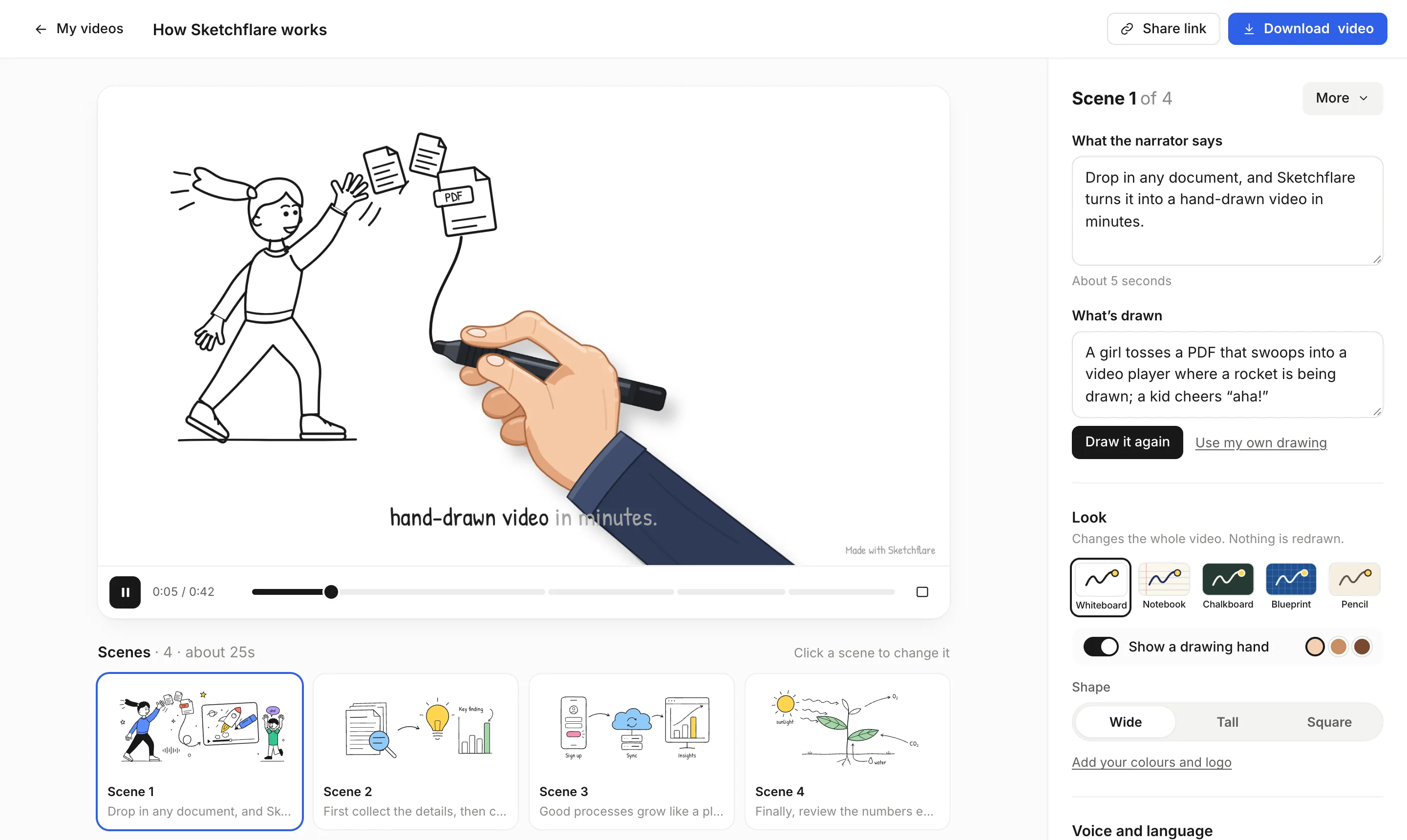
Who it's for: L&D, HR and compliance teams, teachers and course creators who already have the content in a document and want a narrated whiteboard video without drawing anything. You type a topic, upload a PDF, TXT or Markdown file, or paste a finished script (which keeps every word you wrote). Sketchflare writes the script in scenes, draws each scene as line art, records the voice-over and adds word-by-word captions. A typical 1–3 minute video takes a few minutes.
What it does well: fast updates. Each scene has a plain-English “What the narrator says” and “What's drawn” box, so you can change one line and press “Draw it again” rather than rebuilding. Five looks (Whiteboard, Notebook, Chalkboard, Blueprint, Pencil) switch instantly. There are six narrators, 16 languages, lengths from about 30 seconds to 10 minutes, and wide, tall or square shapes. Pro adds Full HD, translation into a new copy, a brand kit and a SCORM 1.2 package that reports completion to your LMS.
Limits: there is no timeline editor, stock footage, music library, avatars, screen recording or team workspace. You can't record your own voice. It works best with text-based PDFs, since charts and scanned pages inside a PDF aren't read by the default AI. If you want to hand-animate every stroke, a manual editor gives you more control.
Price (October 2026): Free $0 (3 video minutes a month, 720p with a small mark). Pro $49 a month (60 video minutes, Full HD, no mark, translations, brand kit, SCORM). Team $99 per person a month (240 minutes per person). See pricing.
2. VideoScribe
Who it's for: people who want to build a classic whiteboard video scene by scene and enjoy the craft. VideoScribe's site names L&D, HR and marketing teams as its main users, along with educators and small businesses.
What it does well: a large library of hand-drawn images, several drawing hands with a range of skin tones, a timeline with camera pans and zooms, and export in widescreen, square and vertical at 1080p. It runs in the browser or as a desktop app, with projects synced between them. Newer AI helpers turn pasted documents into a script, generate images and add AI voice-overs.
Limits: you still assemble the video yourself, so a two-minute piece takes real time. Plans cap downloads and video length: Lite allows 5 downloads a month and 5-minute videos, Core 30 downloads and 10 minutes. AI voice-over minutes only come with Core (75 a month) and Max (150).
Price (October 2026): Lite $91 a year, Core $155 a year, Max $195 a year, per licence. A 7-day free trial allows 3 watermarked downloads.
3. Doodly
Who it's for: solo marketers and small businesses who want to make doodle-style videos on their own computer.
What it does well: whiteboard, blackboard and glassboard scenes, a choice of hand styles, and “Smart Draw”, which lets you upload your own image and set its draw path. You can record voice-over inside the app, add royalty-free music and export up to 1080p. It installs on Mac and PC.
Limits: it is desktop software, so sharing projects across a team is harder than with a browser tool. There's no AI script writing or document import mentioned on its site. Pricing is also confusing: Doodly's pricing link goes to Voomly, where Doodly comes as part of a bundle.
Price (October 2026): Doodly is included with Voomly's Cloud plan at $49 a month or $490 a year, alongside Toonly, Talkia and other tools. The Doodly site also shows a discounted promotional offer, so check the price at checkout. There's a 14-day trial and a 30-day money-back guarantee.
4. Vyond
Who it's for: larger organisations whose L&D, HR and comms teams want one tool for many video styles, with enterprise security and collaboration.
What it does well: Vyond Studio has offered a Whiteboard Animation style since 2014, alongside Business Friendly, Contemporary and, since March 2026, Storybook. Around it sit AI avatars, Vyond Go (a video from text, a document or a URL), PowerPoint and PDF conversion, screen and webcam recording, and translation into 95 languages on the Professional plan.
Limits: it costs much more than the other tools here, and whiteboard is one style among many rather than the focus. Team collaboration starts at the Professional plan.
Price (October 2026): Starter $99 a month or $699 a year per user. Professional $199 a month or $1,199 a year. Enterprise $1,649 a year and Agency $1,999 a year, both billed annually.
5. Powtoon
Who it's for: teams who want whiteboard videos some of the time and other styles the rest, and anyone who needs a genuinely free plan to start.
What it does well: Powtoon offers what it calls hundreds of whiteboard templates, drag-and-drop hand-drawn graphics with an automatic drawing effect, AI script writing, text-to-speech and a doc-to-video feature. Videos can be downloaded or shared to an LMS. There's also an Education plan.
Limits: the free plan is 720p, caps videos at 3 minutes and adds a watermark. Lite allows only 5 watermark-free exports a month. Full template access starts at Professional, and AI features run on credits.
Price (October 2026): Free $0. Lite $15 a month, Professional $40 a month and Advanced $125 a month, all billed yearly. Education $8 a month billed yearly.
6. Animaker
Who it's for: creators and small teams who want a broad, low-cost animation toolkit with whiteboard as one option.
What it does well: whiteboard animations are listed on every paid plan, next to characters, templates, AI text-to-speech and, on higher plans, subtitles and generative video credits.
Limits: Basic caps videos at 5 minutes in HD. Commercial rights are listed from the Pro plan. When we checked, the in-app checkout showed different prices from the public pricing page, so confirm the figure before paying.
Price (October 2026, public pricing page): Basic $15 a month billed yearly ($27 monthly), Starter $25 a month billed yearly ($45 monthly), Pro $43 a month billed yearly ($79 monthly). There is a free plan with watermarked exports.
7. Golpo
Who it's for: people who want an AI-made whiteboard video and value a wide choice of styles and languages.
What it does well: Golpo takes a prompt, a document such as a PDF, a script or your own audio narration and produces a whiteboard explainer. It lists 10+ styles (including sketch and blackboard chalk), pen-in-hand animation, 45+ languages on Creator and above, and frame-level editing after generation.
Limits: the entry plan is black and white only and caps each video at 2 minutes. Longer videos need Growth (up to 4 minutes) or Business (up to 10 minutes). The free tier is one 1-minute video you can't download.
Price (October 2026): Starter $39.99 a month (20 minutes), Creator $99.99 (60 minutes), Growth $199.99 (150 minutes), Business $499.99 (390 minutes). Pay-as-you-go credits cost $3.99 to $7.99 per video minute.
Which whiteboard animation software is best for training videos?
For training, the best tool is the one your team will actually keep up to date, because a video nobody can edit quickly goes stale. Work through these questions in order:
- Where does the content start? If it already lives in policies, slides or manuals, a tool that reads a document saves the most time. With a clear storyboard and time to spare, a manual editor is fine.
- Who will edit it next year? Pick something a non-designer can change in minutes. Scene-by-scene text editing is easier to hand over than a timeline.
- Does it need to go into your LMS? Check for SCORM export, or plan to upload an MP4 and track completion another way. Read what SCORM is if you are unsure.
- Do you need other languages? Count the languages you need and check whether translation is included or charged per minute.
- Do you need people on screen? If you want avatars or screen recordings, Vyond or Powtoon cover that; Sketchflare and the pure whiteboard tools do not.
- What will a year cost at your real volume? Multiply minutes per month by the plan limits, and remember per-user pricing for teams.
Should you hire an animator instead?
Hire an animator for a one-off, high-visibility piece whose content won't change. For anything you'll update, translate or make in volume, software is usually far cheaper. We break the numbers down in how much an explainer video costs and compare the two routes in Sketchflare vs hiring an animator.
What should you test during a free trial?
- Make the same 1–2 minute video in each tool you shortlist, from real content (a policy page, a lesson, a product note).
- Time how long it takes from blank screen to a video you would show your manager.
- Change one fact in the middle and time the edit. This is the cost you will pay every time something changes.
- Listen to the narration with headphones. Check names, numbers and acronyms are pronounced correctly.
- Export at the resolution and shape you need, and test the file in your LMS or video player.
- Read the plan limits on downloads, length, watermarks and commercial use.
If you're new to the format, start with how to make a whiteboard animation and how to write an explainer video script. For head-to-head detail, see our comparisons with VideoScribe, Doodly, Vyond, Powtoon and Animaker.
Questions
What is the easiest whiteboard animation software for beginners?
AI tools such as Sketchflare and Golpo are the easiest because they write, draw and narrate the video for you from a topic or document. Among manual editors, Doodly and VideoScribe are built for non-designers but still ask you to assemble each scene.
Is there free whiteboard animation software?
Yes, with limits. As of October 2026, Sketchflare's free plan gives 3 video minutes a month at 720p with a small mark, Powtoon's free plan allows 3-minute videos at 720p with a watermark, and Animaker has a watermarked free plan. VideoScribe and Doodly offer time-limited trials instead.
Which whiteboard animation software is best for corporate training?
Look for fast scene editing, an LMS export such as SCORM, translation and brand colours. Sketchflare covers those on its Pro plan; Vyond suits large organisations that also want avatars, screen recording and enterprise collaboration, at a higher price.
Is VideoScribe or Doodly better?
VideoScribe runs in the browser and on desktop, has AI script, image and voice helpers, and costs from $91 a year. Doodly is desktop software for Mac and PC with custom draw paths and in-app voice recording, sold as part of the Voomly Cloud bundle. Choose VideoScribe for browser access and AI help, Doodly if you prefer a desktop app and want the bundled tools.
Can AI make a whiteboard animation from a PDF?
Yes. Sketchflare, Golpo and Vyond Go all accept documents. In Sketchflare, text-based PDFs work best, because the default AI reads the text rather than charts or scanned pages.
Sources
- VideoScribe: pricing
- VideoScribe: product overview
- Doodly: product page and offer
- Voomly: pricing (includes Doodly with Cloud and Pro plans)
- Vyond: pricing
- Vyond: product overview
- Vyond blog: Whiteboard Animation action sets (2014)
- Wikipedia: Vyond (animation styles and history)
- Powtoon: pricing
- Powtoon: whiteboard videos
- Animaker: pricing
- Golpo: plans and features