What should an onboarding video include?
An onboarding video should tell a new starter who you are, what will happen on their first day, what the first week and month look like, and who to ask for help. That's it. It isn't the place for the full handbook, the org chart or every policy. Its job is to reduce nerves and answer the questions people are too shy to ask.
There is room to do better. Gallup found that only 12% of employees strongly agree that their organisation does a great job of onboarding new employees, and argues that onboarding is often wrongly treated as a one-day or one-week event. A short video series sent before and during the first month is a cheap way to stretch onboarding across that whole period.
Video also helps with the training new starters must have. The Health and Safety Executive names new recruits among the people with particular training needs, alongside people changing jobs and younger workers. A short safety video in week one makes sure nobody misses the basics because their manager was off sick on day one.
What is a good onboarding video script template?
A good onboarding script template follows the order a new starter experiences things: welcome, who we are, day one, first week, first month, who to ask, recap. The table shows what each part is for and roughly how long to spend on it in a two-minute welcome video.
| Part | Purpose | What to say | Time |
|---|---|---|---|
| 1. Welcome | Make them feel expected | Their role, your genuine pleasure that they're joining, what this video covers | 10 sec |
| 2. Who we are | Give the big picture | What you do, who for, and why it matters, in two or three sentences | 20 sec |
| 3. Day one | Remove first-day nerves | When and where to arrive, who meets them, what they'll do, what to bring | 25 sec |
| 4. First week | Set expectations | Set-up, introductions, the training they'll do, a first small task | 20 sec |
| 5. First month | Show the path | What good looks like by the end of month one, check-ins with their manager | 20 sec |
| 6. Who to ask | Give them permission to ask | Their manager, their buddy, the people team, where the handbook lives | 15 sec |
| 7. Recap | Leave one clear message | The two or three things to remember and a warm sign-off | 10 sec |
Here is the same template as fill-in lines. Replace everything in square brackets, then read it aloud and cut whatever sounds stiff.
- Welcome: “Hi, and welcome to [company]. We're really glad you're joining us as [role]. In the next two minutes you'll find out what your first day, week and month will look like.”
- Who we are: “We [what you do] for [who]. That matters because [the difference you make]. Your work as [role] helps by [how their role connects].”
- Day one: “On your first day, please arrive at [time]. [Your manager / your buddy] will meet you at [reception / the main entrance / a video call link in your email]. You'll spend the morning [setting up / meeting the team] and the afternoon [first activity]. Bring [ID / bank details for payroll / nothing at all].”
- First week: “In your first week you'll [get your accounts set up], meet [the people you'll work with most], and complete [your essential training]. By Friday you'll have [a first small task done].”
- First month: “By the end of your first month, we'd like you to [two or three concrete outcomes]. You'll have regular check-ins with your manager to talk about how it's going.”
- Who to ask: “You'll have lots of questions, and that's normal. Ask your manager, your buddy, or the people team. The handbook is in [place].”
- Recap: “So: arrive at [time], your buddy will meet you, and ask anything. We can't wait to work with you.”
What does a finished onboarding script look like?
Here is the template filled in for a made-up company: a mid-sized home insurance firm welcoming a new claims handler. It runs to about 220 words, which fits comfortably in a two-minute video with pauses for the drawings. In edX research, instructors spoke at an average of 156 words a minute, so 300 words is a sensible ceiling for two minutes.
Scene 1. Says Hi, and welcome to the team. We're really glad you're joining us as a claims handler. In the next two minutes, you'll see what your first day, week and month will look like.
Drawn A front door with a welcome mat and a speech bubble saying Welcome. A small figure stepping through the door.
Scene 2. Says We insure people's homes. When something goes wrong, a burst pipe or a break-in, we're the people they call. Claims handlers are the voice they hear on one of the worst days of their year.
Drawn A simple house with a burst pipe dripping water on one side, a phone with sound waves on the other, connected by an arrow.
Scene 3. Says On your first day, please arrive at nine. Your buddy will meet you at reception. You'll spend the morning getting set up and the afternoon listening in on real calls with your buddy. Just bring photo ID.
Drawn A clock showing 9:00, a reception desk with two figures shaking hands, and a laptop with a headset next to it. An ID card labelled Bring this.
Scene 4. Says In your first week, you'll get access to our claims system, meet the team you'll sit with, and complete your essential training: data protection, safety, and how we treat customers fairly.
Drawn A calendar page labelled Week 1 with three ticked boxes labelled Data protection, Safety and Treating customers fairly.
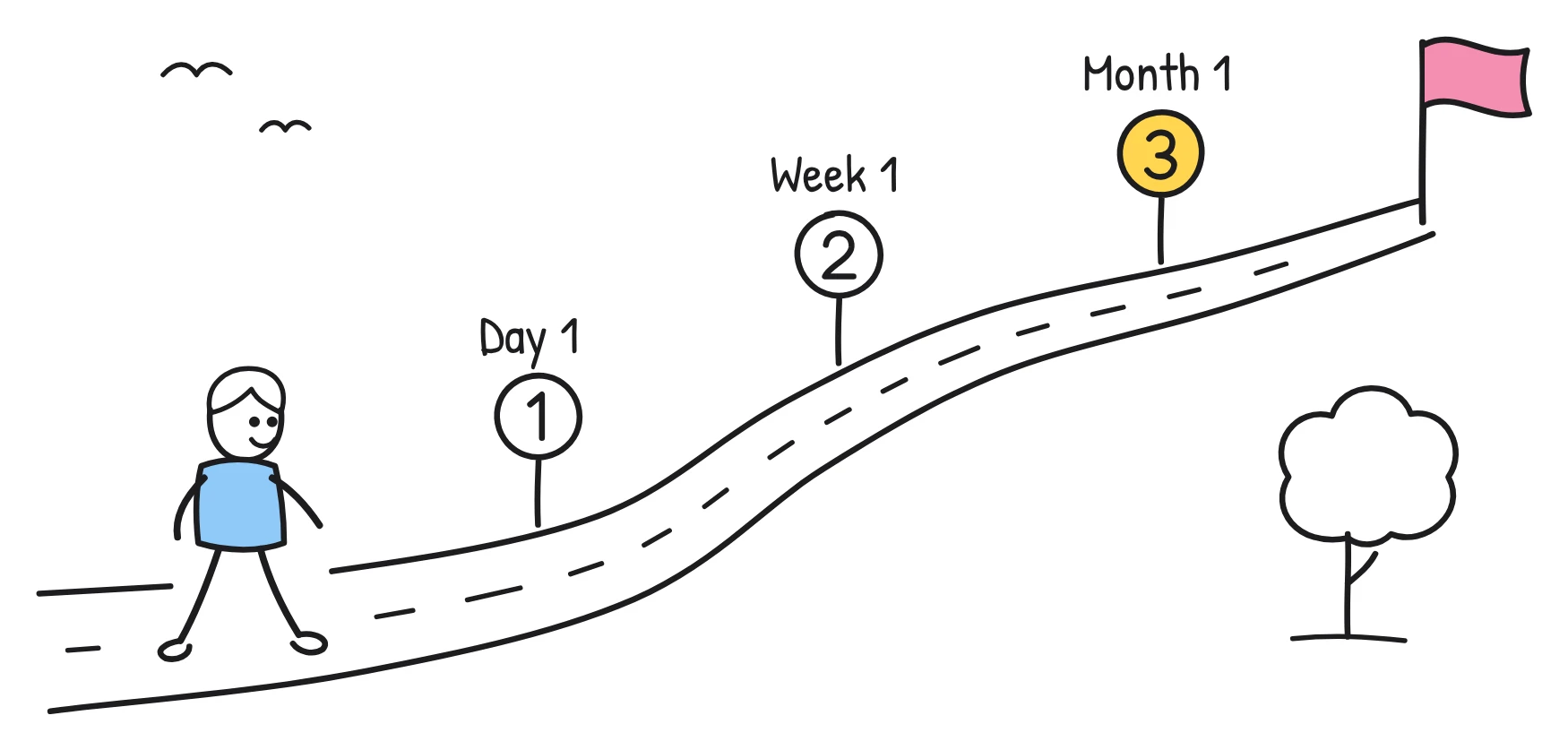
Scene 5. Says By the end of your first month, you'll be handling simple claims on your own, with your buddy nearby. You'll have a check-in with your manager every week to talk about how it's going.
Drawn A path with three signposts labelled Day 1, Week 1 and Month 1. At Month 1, a figure with a headset and a small thumbs-up.
Scene 6. Says You'll have lots of questions, and that's completely normal. Ask your manager, your buddy, or the people team. The handbook is on the intranet, under New starters.
Drawn Three speech bubbles with question marks pointing to three labelled figures: Manager, Buddy and People team. A book labelled Handbook below them.
Scene 7. Says So: arrive at nine, your buddy will meet you, and ask anything. We can't wait to work with you.
Drawn A short checklist: 9:00, Buddy meets you, Ask anything. A smiling sun in the corner.
Notice the details that are missing. There is no buddy's name, no floor number, no salary date and no benefits figure. All of those belong in the welcome email or the handbook.
How do you plan an onboarding video series?
Plan an onboarding series as five short videos, each sent at the moment the new starter needs it. One long film forces people to remember day-one logistics and month-one goals at the same time. A series spreads the load and gives you a reason to stay in touch before they start.
| Video | What it covers | When to send | Length | Look |
|---|---|---|---|---|
| 1. Welcome and who we are | Why you exist, who you serve, how their role fits in | When the offer is accepted | 2 min | Whiteboard |
| 2. Your first day | Arrival, who meets them, the day's plan, what to bring | Two or three days before day one | 1 min | Notebook |
| 3. How we work | Tools you use, how teams communicate, your values shown as everyday behaviour | Day two or three | 2 min | Whiteboard |
| 4. Your first month | Goals for month one, check-ins, training plan, how to ask for help | End of week one | 2 min | Pencil |
| 5. Policies that matter | Safety, data protection and how to speak up, one behaviour each | During week one or two | 3 min | Blueprint |
Video five can draw on our list of compliance training video ideas. If your policies need more than three minutes, split them into separate one-minute videos and use the approach in microlearning videos.
What should you leave out of an onboarding video?
Leave out anything that changes more often than you'll update the video. A video that says the wrong room number or a manager who left last spring tells new starters that nobody is paying attention. Keep these in a written checklist or the welcome email instead:
- People's names, unless the person founded the company and isn't going anywhere. Use roles instead.
- Rooms, floors, desk numbers and parking details. Offices get reorganised.
- Wi-Fi names, passwords and door codes. These change, and they shouldn't be in a video that might be shared outside the company.
- Dates and times of specific events, like the next all-hands or induction day.
- Pay dates, salary details and benefit amounts. These vary by person and change at renewal.
- Screens from your software. Interfaces change with every update; describe the task instead.
- The org chart. Teams change too often. Explain how the company is organised in general terms.
- Full policy wording. Explain the one behaviour and link to the current policy.
How do you write onboarding narration that sounds human?
Write onboarding narration the way your friendliest manager would say it out loud. A few rules help:
- Talk to one person and use “you”. “You'll meet your buddy” beats “New employees will be introduced to their buddy.”
- Keep sentences short enough to say in one breath.
- Use the words people use in your office, not HR terms. “Your first few weeks” is clearer than “the induction period”.
- Read the script aloud before you record. Anything you stumble over, rewrite.
- End warmly. The last line is what people remember.
For more on structure and pacing, see how to write an explainer video script.
How do you make onboarding videos with Sketchflare?
Paste your script with “Paste my script” so every word stays as you wrote it, or type a topic like “first-day welcome for a new claims handler” and let Sketchflare write a draft. Choose a voice such as George (a warm British storyteller) or Matilda (friendly and upbeat, American), pick Wide 16:9 for your intranet or LMS, and press “Make my video”.
A share link is handy for new starters who don't yet have system access: anyone with the link can watch, no account needed, and you can turn sharing off at any time. On Pro and Team you can add your logo and brand colours to every frame, export a SCORM 1.2 package for your LMS, and make a copy in another of the 16 languages for teams abroad. When something changes, edit what the narrator says in a single scene instead of remaking the whole video. See employee onboarding videos for the full workflow.
Questions
How long should an onboarding video be?
A welcome video works best at about two minutes. If you have more to say, make a short series of one- to three-minute videos sent across the first month rather than one long film.
What should be in an employee onboarding video?
Cover a welcome, who you are, what happens on day one, the first week and the first month, who to ask for help, and a short recap. Keep names, rooms, dates and pay details in a written checklist.
When should new starters watch the onboarding video?
Send the welcome video when the offer is accepted and the first-day video two or three days before they start. Send later videos as each stage begins, so the information arrives when it's useful.
Should the CEO be in the onboarding video?
A personal welcome from a leader can help, but it isn't required. An illustrated video with a clear narrator is quicker to update and doesn't go out of date when leadership changes.
Can I make onboarding videos in other languages?
Yes. Sketchflare makes videos in 16 languages, and on Pro and Team plans you can make a translated copy of a finished video, including the text inside the drawings.